Hotkey Overview
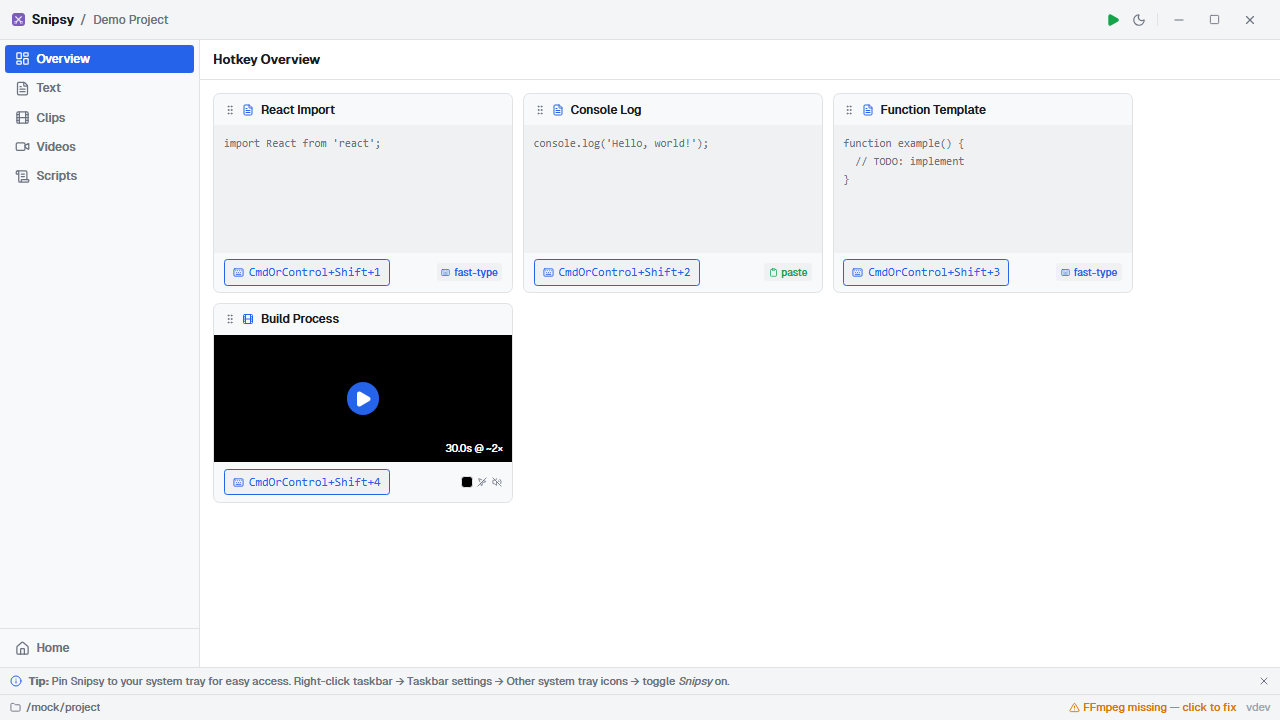
The Hotkey Overview is the home screen when you open a project — a visual dashboard of every snippet and its assigned hotkey.
Card Layout
Section titled “Card Layout”Each snippet appears as a card showing:
- Title and description
- Hotkey badge (e.g.,
Ctrl+Shift+1) - Type indicator — text icon or film icon
- Status icons — delivery mode for text, mute/speed for video
Drag to Reorder
Section titled “Drag to Reorder”Cards can be dragged and dropped to reorder them. This is purely visual — it lets you arrange your dashboard to match the flow of your presentation. The order is saved in your browser’s local storage.
Quick Actions
Section titled “Quick Actions”- Click a card to jump to its edit form
- Play button on video cards to preview playback
Visual Indicators
Section titled “Visual Indicators”| Icon | Meaning |
|---|---|
| ⌨️ Fast-type | Text delivered keystroke by keystroke |
| 📋 Paste | Text delivered via clipboard |
| 🔇 Muted | Video audio is suppressed |
| 🔊 Unmuted | Video audio will play |